










































You’ve been there. It’s 2am on Shabbos in your hotel. You set the thermostat to 68 degrees before candle lighting, went to shul, had a beautiful meal, and went to sleep. Three hours later you’re sweating through your sheets because the room is 78 degrees and the AC has gone completely silent. You didn’t touch anything. You didn’t do anything wrong. The hotel’s energy management system decided you were no longer worth cooling.
This is not a fluke. It’s a feature.
Hotels have been quietly installing smart thermostat systems for years, and the whole point is to save money by cutting the AC when they think the room is empty. These systems use passive infrared (PIR) motion sensors to detect occupancy. Lie still long enough and the system concludes you’ve left, then dials the temperature back up to whatever default the hotel has programmed. For a light sleeper who tosses and turns all night, this might not be a big deal. For someone who just came home from a Friday night seudah and konked out, or who spent a Shabbos afternoon napping in the armchair, it’s a legitimate problem with no obvious fix.
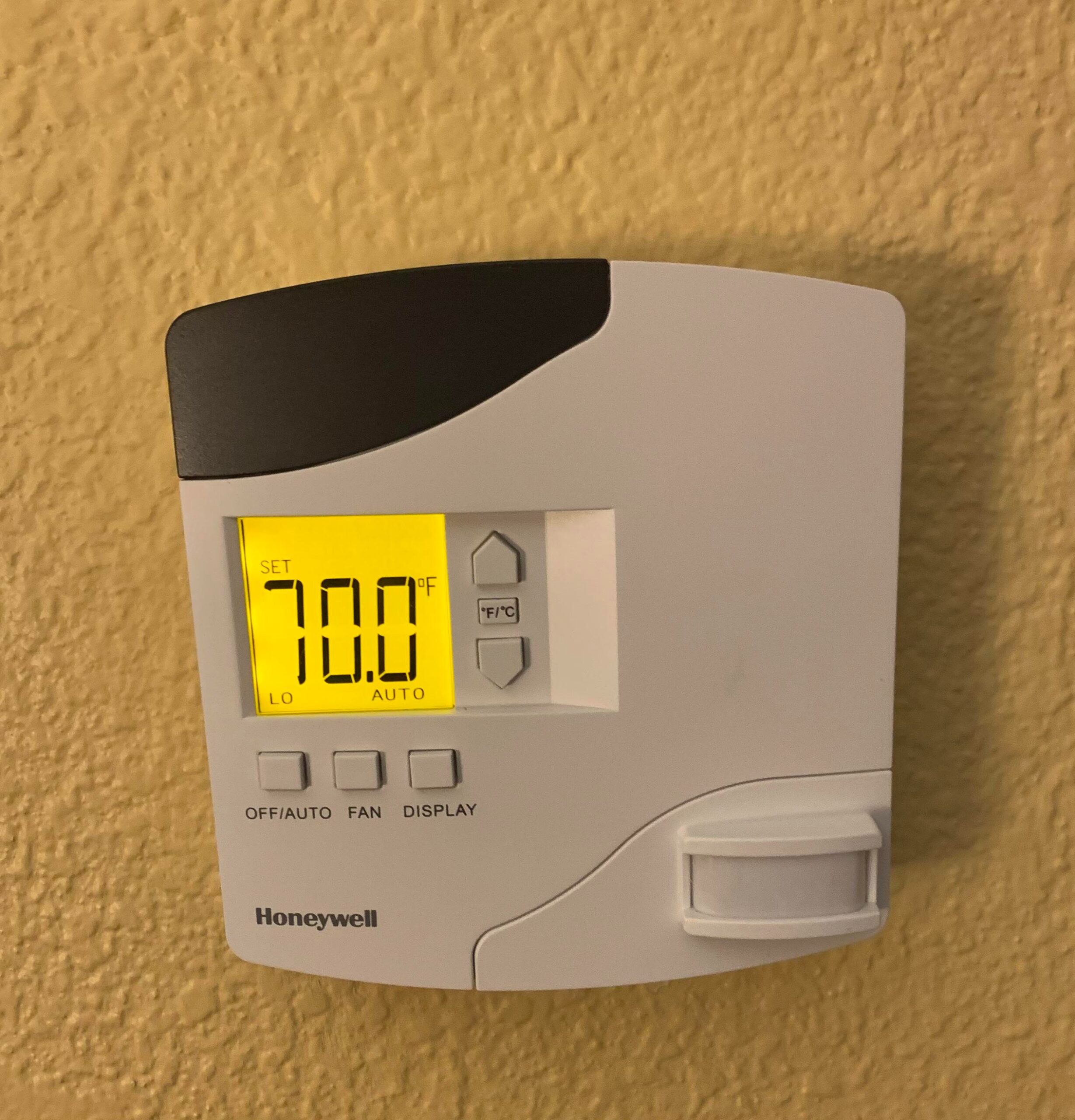
The most widely deployed of these systems is made by Honeywell under the INNCOM brand. If you’ve stayed at a Hyatt, Sheraton, Marriott, Hilton, Holiday Inn, Hard Rock, DoubleTree, InterContinental, or about a thousand other properties in the last decade, there is a very good chance you’ve woken up in an overheated room because of one of these thermostats. Honeywell has reported the system is installed in over one million hotel rooms worldwide.
Here’s what the hotel doesn’t advertise: there is a built-in override.
VIP Mode: The Hidden Setting Hotels Use for Important Guests
INNCOM’s own product documentation describes it. It’s called Limited Energy Management mode, or LEM mode, and it’s also commonly referred to as VIP mode. According to the official manual, it’s “a special mode that can be enabled when an important or discriminating guest is checked into a room.” In VIP mode, the thermostat allows a much wider temperature range, ignores the motion sensor, and keeps running regardless of whether the system thinks anyone is in the room.
The hotel can enable it from the front desk for any guest. You can also enable it yourself at the thermostat in about three seconds.
How to Activate VIP Mode on a Honeywell INNCOM Thermostat
Look at the thermostat. If it has a display screen, a power button, and up/down arrows, there is a reasonable chance this works. The sequence is:
- Press and hold the Display button.
- While holding Display, press and release the Off/Power button.
- While still holding Display, press and release the Up arrow.
- Release the Display button.
If it worked, the screen will briefly show VIP or LEn. That’s your confirmation. The motion sensor is now disabled and the temperature floor has been dropped well below the hotel’s usual limit. You can now set it as cold as you need and it will stay there whether or not the room detects any movement.
The key is doing it quickly. The button presses need to follow each other in rapid succession. If you’re getting drt on the display instead of VIP, you’re moving too slowly. Try again faster.
To turn VIP mode off when you check out, do the same sequence but press the Down arrow instead of the Up arrow in step three.
This Works on Other Thermostat Brands Too
INNCOM isn’t the only system out there. A few other overrides worth knowing:
SensorStat-DDC: Press the On/Off and Down arrow buttons simultaneously. The display will show bP for bypass mode. This one may need to be repeated every 24 hours or so.
Trane (common in Accor properties): Hold the central Override button. When the display shows PswrdSet 0, keep pressing Override until you see cool min or heat max, then use the arrow keys to set your preferred temperature. These settings persist until you manually change them back.
Lornix: Press Up and Down simultaneously to enter the settings menu. Navigate to CH-C and press the second button from the left to adjust the temperature floor.
The Shabbos and Yom Tov Case
For most travelers, this hack is about personal comfort. For Shabbos and Yom Tov observers, it’s something more practical than that. You cannot make thermostat adjustments on Shabbos. You set your temperature before Shabbat comes in, and whatever happens after that is out of your hands. A motion-sensing thermostat that quietly sabotages your settings while you sleep or rest is a real quality-of-life problem with a real halachic dimension, since you can’t just walk over and fix it.
Activating VIP mode before Shabbat removes that variable entirely. The room holds your temperature through the night, through long Shabbos afternoon rests, through 25 hours of being in and out without the system second-guessing your presence.
A Few Caveats
This is a legitimate feature built into the thermostat by the manufacturer, not a jailbreak. You’re not breaking anything. Hotels are aware it exists. That said, a few notes:
Newer INNCOM models have updated firmware, and some readers report the sequence no longer works on certain properties, showing numbers on the display instead of VIP. If the hack doesn’t work, just call the front desk and ask them to put you in VIP or LEM mode directly. You’re entitled to ask.
There have been some reports of hotels issuing fines related to thermostat tampering, specifically tied to guests who physically damaged thermostats while trying various workarounds. Activating VIP mode through the button sequence as described is not damaging anything, but it’s worth being sensible about.
And if none of this works on whatever mystery thermostat your particular hotel has installed, the old-fashioned approach still applies: call down to the front desk, explain that you need full temperature control for religious reasons over Shabbat, and ask them to override it from their end. Many hotels will do this without any issue.